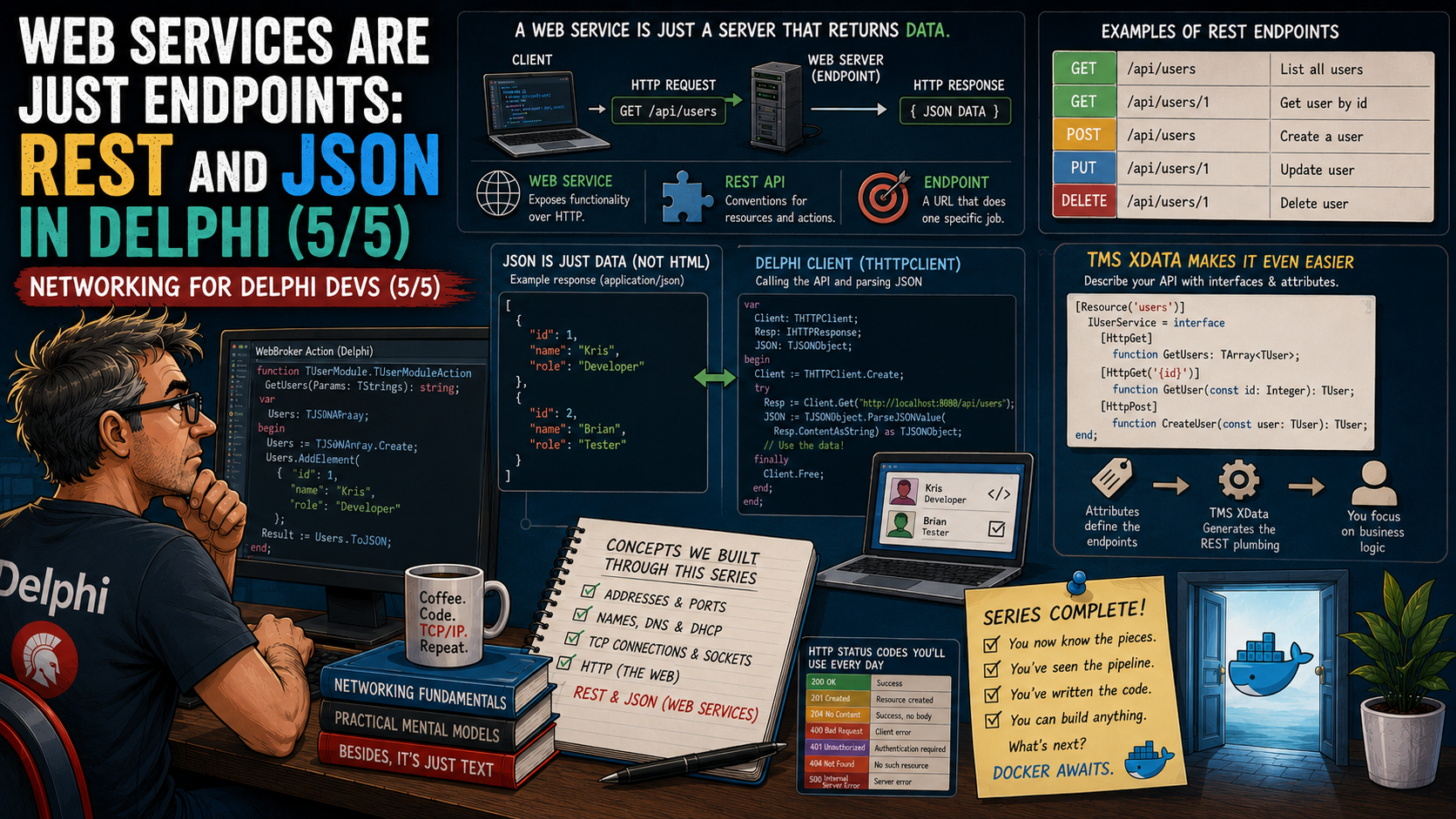
Part 4 ended on a quiet little bombshell. We built a web server with WebBroker, watched a browser send GET / down a TCP connection, and sent back HTML — and then I pointed out that nothing in HTTP says the response has to be HTML. A computed response can just as easily be data.
That one sentence is the entire secret of this final part. Because the moment your server returns data instead of pages, it stops being "a website" and starts being what the rest of the industry calls a web service. Add a couple of naming conventions and you have a REST API. Give one of its URLs a job to do and you have an endpoint.
Those three terms intimidate a lot of seasoned desktop developers — I've watched it happen in consulting sessions. And it's completely unnecessary, because by the end of Part 4 you had already built one. You just hadn't been introduced.
So this finale does three things: it demystifies the vocabulary word by word, it shows the full round trip in real Delphi code — a WebBroker action serving JSON, and a desktop app consuming it with THTTPClient — and it shows how TMS XData turns everything this series taught you into a few attributes on an ordinary Delphi interface. Then we close the series where it was always heading: at the doorway marked Docker.
This is the last stop on a five-part journey, so here is the full map.
The vocabulary, demystified
Every scary word in this topic describes something small. Let's take them one at a time, in plain language, and pin each to what you already know from Parts 1–4.
- Web service — a web server whose responses are meant for programs, not people. Same port, same TCP connection, same HTTP request/response cycle as Part 4. Only the content type of the answer changes.
- Endpoint — one URL on that server with behavior behind it.
http://localhost:8080/statusis an endpoint: request it, and code runs and returns an answer. If you wrote a WebBroker action in Part 4, you have already written an endpoint. - API — application programming interface: the full set of endpoints a service offers, plus the rules for calling them. It's the service's contract, the way a Delphi unit's
interfacesection is a contract. - REST — a style of arranging an API: URLs name things, HTTP methods say what to do to them. More on this in a moment.
- Payload / request body — the data you ship along with a request or response. When your app POSTs a new customer as JSON, that JSON is the payload, carried in the HTTP body you met in Part 4.
Notice something? Not one of these words introduced a new mechanism. Ports, names, connections, HTTP — the machinery is exactly the stack you already built. Here is the whole shift in one picture.
Read that diagram bottom to top: the lower arrow is the entire subject of this post. When the requester is a program, the server answers in a format a program parses effortlessly — and the format the whole industry has settled on is JSON.
JSON in sixty seconds
JSON — JavaScript Object Notation, defined at json.org — is structured text that both humans and programs read easily. If you can read a Delphi record declaration, you can read JSON on sight. Here's a Delphi record and its JSON twin side by side:
type
  TServerStatus = record
    Status: string;         // 'ok'
    Version: string;        // '1.4.2'
    UptimeSeconds: Integer; // 86400
  end;
The same information as a JSON document — curly braces for the object, "name": value pairs, square brackets (not shown here) for arrays:
{
  "status": "ok",
  "version": "1.4.2",
  "uptimeSeconds": 86400
}
Delphi ships everything needed to move between the two, no third-party code required. System.JSON gives you TJSONObject.ParseJSONValue for walking a document by hand — you'll see it in action below. And for the "just map it onto my class" case, the TJson class in unit REST.Json converts in one line each way: TJson.ObjectToJsonString(MyObject) serializes an object to a JSON string, and TJson.JsonToObject<T>(MyString) builds an object back from one. When a JSON key doesn't line up with your field name, the JSONName attribute from REST.Json.Types pins the mapping explicitly.
That's genuinely all the JSON theory this series needs: it's the text format your endpoints speak.
REST: things get URLs, verbs do the work
"REST API" sounds like it should come with a certification exam. The working intuition fits in two sentences. URLs name things — resources, in REST vocabulary: customers, orders, invoices. HTTP methods say what to do to them — the same GET, POST, PUT, and DELETE methods you met as request verbs in Part 4, now carrying their dictionary meanings: read, create, replace, remove.
Cross the two and you can predict almost any real-world API without reading its documentation. The grid below is that whole mental model.
Read any cell as verb + URL = operation: GET /customers/42 fetches one customer as JSON; POST /customers with a JSON payload creates one. The noun lives in the URL, the verb lives in the method, the data rides in the body. That's the intuition working developers actually use day to day. For completeness: "REST" does have a formal definition — it comes from Roy Fielding's 2000 dissertation, which describes a set of architectural constraints — but you don't need the formal treatment to read, consume, or design perfectly good APIs.
Proof by WebBroker: your Part 4 server is already a web service
Let's make the thesis literal with the smallest possible change to what you built last time. In Part 4's WebBroker application, an action is a URL path wired to an event handler. Here is an action for the path /status — and the only novelty compared to Part 4 is two property assignments on TWebResponse:
procedure TWebModule1.StatusActionAction(Sender: TObject;
  Request: TWebRequest; Response: TWebResponse; var Handled: Boolean);
begin
  // The whole difference between a website and a web service:
  Response.ContentType := 'application/json';
  Response.Content :=
    '{ "status": "ok", "version": "1.4.2", "uptimeSeconds": 86400 }';
end;
Run it, open http://localhost:8080/status in a browser, and you'll see raw JSON instead of a page. Congratulations — that browser tab is looking at an endpoint. ContentType telling the client "this is application/json" is the polite label; the JSON string in Content is the payload. No new component, no new protocol, no framework. A web service is a web server returning data.
Full circle: your desktop app as the client
Now for the half that matters most in practice. Here's an opinion I'll state plainly and stand behind: for most Delphi desktop teams, consuming web services is 90 % of the real-world need — calling a payment provider, a shipping API, a license server, your own backend — while hosting one is the rarer job. That's my experience from years of consulting, not a measured statistic, so weigh it accordingly; if your product ships a server, the balance obviously flips. Either way, the client side is where we start.
Delphi's built-in client is THTTPClient in unit System.Net.HttpClient — with a drop-on-the-form component wrapper, TNetHTTPClient in System.Net.HttpClientComponent, if you prefer the RAD workflow. Both are the modern, cross-platform RTL clients and they work identically in Delphi 13 Florence, the current release. Calling our endpoint and parsing the answer takes this:
uses
  System.Net.HttpClient, System.JSON, System.SysUtils;

procedure TMainForm.ShowServerStatus;
var
  LClient: THTTPClient;
  LResp: IHTTPResponse;
  LRoot: TJSONObject;
begin
  LClient := THTTPClient.Create;
  try
    // One line: send GET, wait for the HTTP response (Part 4's cycle).
    LResp := LClient.Get('http://localhost:8080/status');
    if LResp.StatusCode <> 200 then
      raise Exception.CreateFmt('Endpoint returned %d', [LResp.StatusCode]);

    // Parse the JSON payload into a walkable object tree.
    LRoot := TJSONObject.ParseJSONValue(LResp.ContentAsString) as TJSONObject;
    try
      lblVersion.Caption := LRoot.GetValue<string>('version');
      lblUptime.Caption  := LRoot.GetValue<Integer>('uptimeSeconds').ToString + ' s';
    finally
      LRoot.Free;
    end;
  finally
    LClient.Free;
  end;
end;
Take a second to appreciate what just happened across the series. Your VCL app resolved a name (Part 2) to an address and port (Part 1), opened a TCP connection (Part 3), spoke HTTP (Part 4), and consumed a web service (Part 5) — in about fifteen lines, most of which are try..finally hygiene. Here is that round trip as one picture.
The two horizontal arrows are Part 4's request/response cycle; the dashed box underneath is Parts 1–3 doing their invisible work. Your desktop app is now a web-service client — and every cloud API on the planet is consumed with exactly this pattern.
The grown-up server: TMS XData
Hand-writing JSON strings in a WebBroker action is perfect for understanding, but a real API needs routing for many endpoints, automatic JSON serialization of your objects, parameter binding, error handling. That's what a framework buys you, and the one I reach for in the commercial Delphi world is TMS XData, built on the TMS Sparkle HTTP framework.
XData's core idea is beautiful for a Delphi developer: you declare a service contract as an ordinary Delphi interface, and the framework turns it into HTTP endpoints. Per the official service operations documentation, the contract side looks like this:
uses
  XData.Service.Common;

type
  [ServiceContract]
  IServerInfoService = interface(IInvokable)
    ['{D8F62F84-6A2E-4C4B-9D0A-3C5B7C11A9E4}']
    [HttpGet] function Status: string;
    function Echo(const Text: string): string;
  end;

initialization
  RegisterServiceType(TypeInfo(IServerInfoService));
One line per new concept: [ServiceContract] marks the interface as a service; inheriting IInvokable (plus the GUID) enables the RTTI the framework needs; [HttpGet] binds Status to a GET request — by default, XData operations respond to POST, so this attribute is our REST verb dial; and RegisterServiceType tells XData the interface exists. The implementation is equally unexciting — an ordinary class implementing the interface, marked [ServiceImplementation] and registered the same way:
uses
  XData.Server.Module, XData.Service.Common;

type
  [ServiceImplementation]
  TServerInfoService = class(TInterfacedObject, IServerInfoService)
  public
    function Status: string;
    function Echo(const Text: string): string;
  end;

function TServerInfoService.Status: string;
begin
  Result := 'ok';
end;

initialization
  RegisterServiceType(TServerInfoService);
And hosting it, per the getting-started guide, is a server object plus a module — TXDataServerModule has a constructor overload that takes just the base URL, so no database is required for pure service endpoints:
uses
  Sparkle.HttpSys.Server, XData.Server.Module;

var
  Server: THttpSysServer;
begin
  Server := THttpSysServer.Create;
  Server.AddModule(TXDataServerModule.Create('http://localhost:2001/tms/api'));
  Server.Start;  // GET /tms/api/serverinfoservice/status now answers {"value":"ok"}
end;
If you prefer components over code, XData also ships design-time components — drop a TSparkleHttpSysDispatcher and a TXDataServer on a form, set BaseUrl, flip Active to true. And on the consuming side there's a lovely symmetry: TXDataClient lets a Delphi client call the service through the very same interface — Client.Service<IServerInfoService>.Status — no manual HTTP or JSON at all. Methods can return your own classes or TList<T>, and XData serializes them to JSON automatically; it can even serve interactive OpenAPI/SwaggerUI documentation for your endpoints — OpenAPI being the standard machine-readable way to describe an API, a topic for another day.
Step back and look at what those attributes just absorbed: ports, routing, HTTP verbs, JSON serialization — the entire series, folded into a Delphi interface declaration. That's the payoff of a good framework.
The whole series in one picture
Five posts, one staircase. Each part answered exactly one question, and each answer became the floor the next part stood on.
Read it left to right and the once-intimidating sentence "our REST API exposes JSON endpoints over HTTPS" decomposes into five small ideas you now own. Nothing in networking above this level is magic either — it's these five blocks, recombined.
The doorway marked Docker
There's a reason this series exists, and I can finally say it out loud: everything you just learned is precisely the vocabulary of containers. Docker — the tool that packages an application with everything it needs into an isolated, runs-anywhere unit called a container — intimidates desktop developers for exactly the same reason "REST API" did: the words are unfamiliar. But look at what the words actually are.
Every right-hand box is a left-hand box wearing different clothes. That cryptic -p 8080:80 in every Docker tutorial? It's port mapping — "requests to host port 8080 go to the program's port 80 inside the container." Pure Part 1. Containers finding each other as db or api instead of by IP address? Name resolution — Docker networks have built-in DNS. Pure Part 2. And "deploying a containerized REST API"? It's the web service from this very post, packed in a box with its runtime, listening on a port, answering HTTP with JSON. You could write that API in Delphi with XData today and it would be none the wiser about the box around it.
I'm deliberately not teaching Docker here — that deserves its own series, and it's getting one: a Docker series for Delphi developers is coming next on this blog, standing on the foundation these five parts just poured. When it arrives, you won't be learning a strange new world. You'll be recognizing an old one.
Takeaways
The intimidating vocabulary was the only hard part, and it's gone now. A web service is a web server that returns data. An endpoint is a URL with code behind it. REST is nouns in URLs and verbs in methods. JSON is structured text your RTL parses natively. Your Delphi app can consume any of it with THTTPClient, and frameworks like TMS XData — or the open-source DelphiMVCFramework — let it serve all of it with the tools you already think in: interfaces, attributes, classes.
Five parts ago, "the app talks to a REST API on port 443" was a sentence full of strangers. Today every word in it is an acquaintance — and the next series will only add one more: container.
If your Delphi product needs to consume a cloud API or grow a web-service backend of its own — and you'd like someone who has walked this exact road with legacy VCL codebases — let's talk. And I'll see you at the Docker series.